





Over 500,000 customers already trust us. With us you get:
same-day shipping for products marked “24h shipping”
our own service centre in Poland
30 days to return and free delivery in Poland from PLN 500
4.9/5 on TrustMate and 4.9/5 on Google (almost 4,000 reviews)
VAT invoice, leasing and instalments for businesses
For businesses
individual quote for larger quantities
VAT invoice
For schools and universities
orders based on requests for quotation
help with choosing kits for your lab

Snapmaker U1 - 3D printer
The Snapmaker U1 is a 3D printer with four toolheads that it swaps in 5 seconds. You print in several colors and materials at once, with far less waste than with a single nozzle.
- Build volume 270 x 270 x 270 mm and speed up to 500 mm/s
- In the box: 4 toolheads and 4 spools of SnapSpeed PLA, 500 g each
- The top cover for ABS and ASA is sold separately
We could not load the price.
The promotional price does not combine with quantity discounts.
3D printer with toolhead swapping for color printing
The Snapmaker U1 is a 3D printer with the SnapSwap tool changing system. It has four independent toolheads, and each one prints with its own filament. Changing the color or material means swapping the whole toolhead in 5 seconds, without pushing old filament through a shared nozzle. As a result, multi-color printing uses up to 85% less material on waste than a printer that switches filament in a single nozzle. The CoreXY design moves the toolhead at up to 500 mm/s, and the build volume is 270 x 270 x 270 mm.

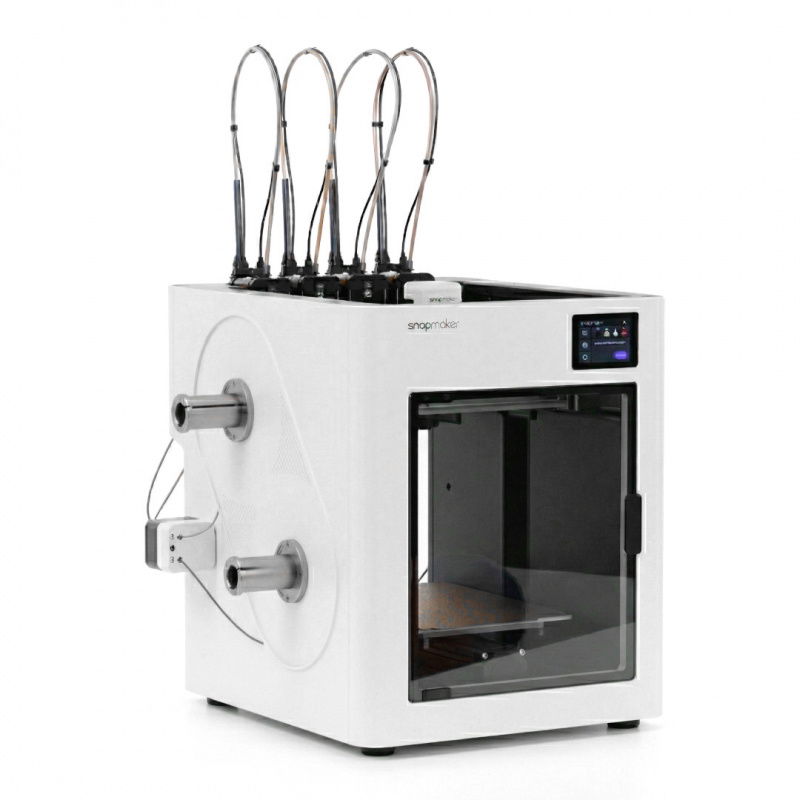
Snapmaker U1 with four toolheads under the top edge of the housing and spool holders on the side
4 toolheads
toolhead swap in 5 seconds
up to 85%
less waste in color printing
270 mm
build volume 270 x 270 x 270 mm
500 mm/s
maximum toolhead speed
What sets this model apart
A separate nozzle for every color
Each filament stays loaded in its own preheated toolhead. The printer does not purge the nozzle when changing colors; it simply parks one toolhead and picks up the next.
5 s
toolhead swap
0.04 mm
toolhead alignment accuracy
1,000,000
swaps in tests without mechanical failure

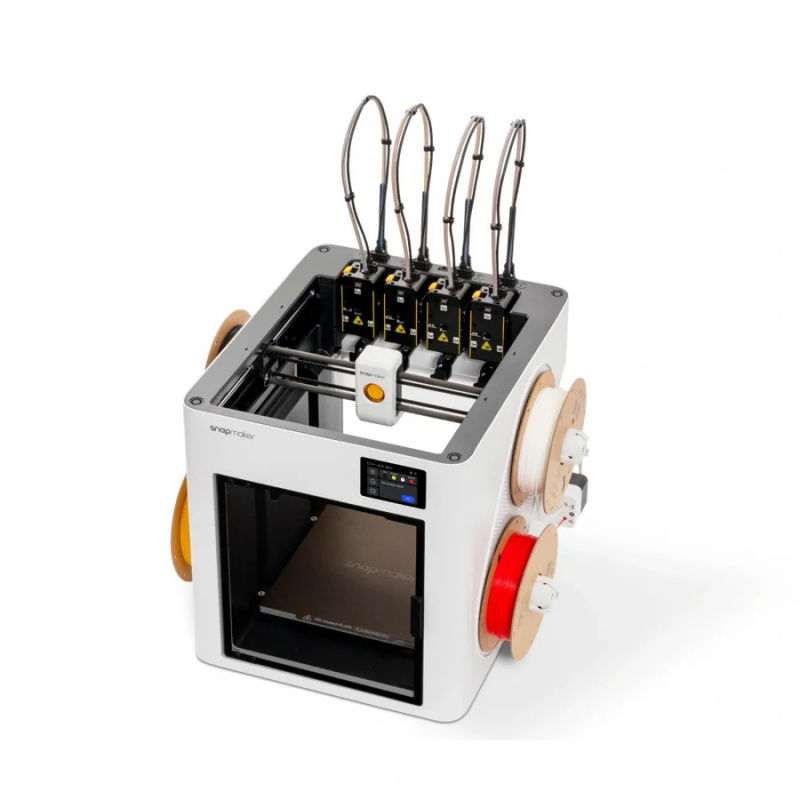
The four U1 toolheads in their docks under the top edge of the housing
SnapSwap: four toolheads instead of one nozzle
In a conventional multi-color printer, one nozzle handles all filaments, so with every color change the printer retracts the old material, cuts it and pushes in the new one. In the U1, each color has its own toolhead with a hotend. The toolheads wait preheated in their docks, and the SnapSwap mechanism picks up the one it needs and parks the previous one in 5 seconds. Fast motion comes from the CoreXY system, which drives the active toolhead at up to 500 mm/s.
- Swap: 5 seconds, without purging or cutting filament
- Toolheads on standby: preheated, no waiting for heat-up
- Motion: CoreXY, up to 500 mm/s and 20,000 mm/s²
Up to 85% less waste in color printing
In printers that switch filament in a single nozzle, purge waste often weighs more than the model itself. The U1 swaps the toolhead when changing colors, so it does not need to purge the nozzle. A small prime tower remains, which clears leftover material from toolheads waiting on standby. According to the manufacturer's tests, the U1 uses up to 85% less filament on waste for the same multi-color models.
- Castle Tower: 11 h 43 min and 87.42 g of waste on the U1 versus 39 h 55 min and 586.02 g
- 4-color dragon: 6 h 58 min and 80.68 g versus 21 h 29 min and 309.75 g
- Hexagon vase: 16 h 44 min and 241.96 g versus 75 h 18 min and 1452.26 g

Waste comparison when printing a dragon in 4 colors

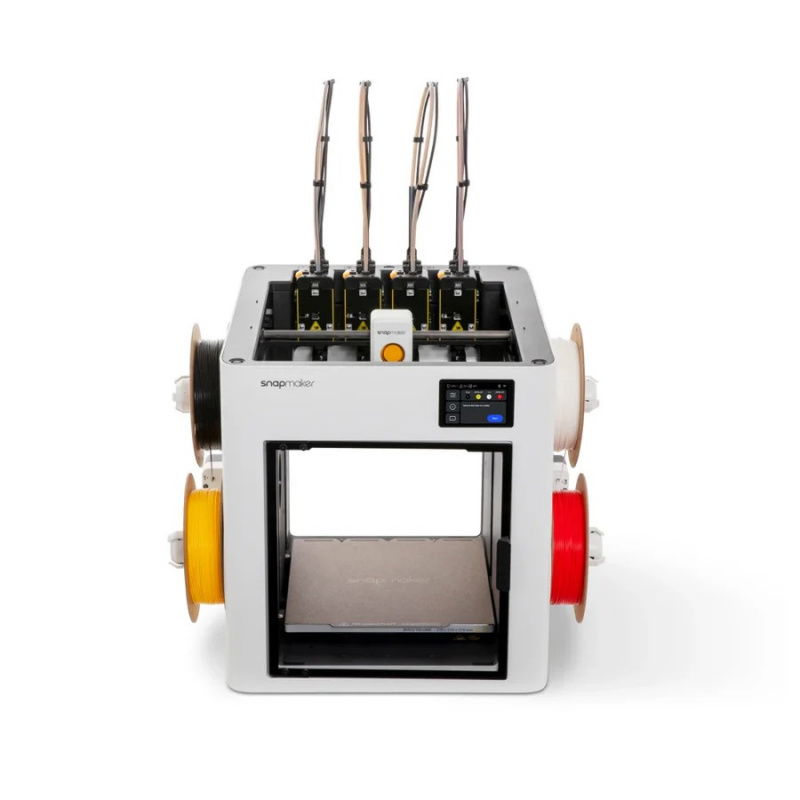
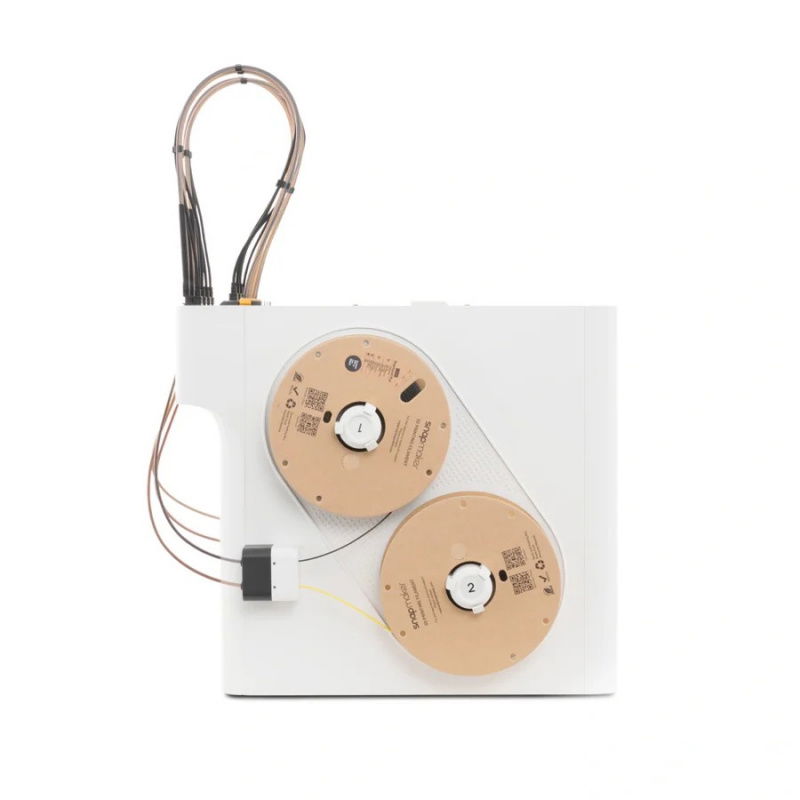
Snapmaker U1 with spools in two colors on the holders
Several materials in one print
Four independent toolheads let you combine materials with different properties in one model, without them mixing in the nozzle. You can pair rigid PETG with flexible TPU, TPU of different hardness, or a model with water-soluble PVA supports. Instead of gluing parts after printing, you get a finished part straight from the printer. The manufacturer shows, for example, perforated clogs made of two types of TPU.
- Rigid and flexible: PETG HF with TPU 95A HF
- Different hardness: TPU 95A HF with TPU 90A
- Soluble supports: SnapSpeed PLA with PVA
- With the top cover: ASA with PAHT-CF
Automatic calibration at high speed
The U1 sets the XYZ offsets between its four toolheads by itself and keeps them within 0.04 mm, so colors and supports land exactly in place. Input Shaping with an accelerometer damps vibrations during fast moves and direction changes, which reduces ghosting. Pressure Advance adjusts extrusion to changes in speed and direction, and automatic bed leveling maps the plate before the first layer is printed.
- Toolheads: automatic XYZ offset calibration, up to 0.04 mm
- Vibration: Input Shaping with an accelerometer
- Extrusion: Pressure Advance
- First layer: mesh bed leveling
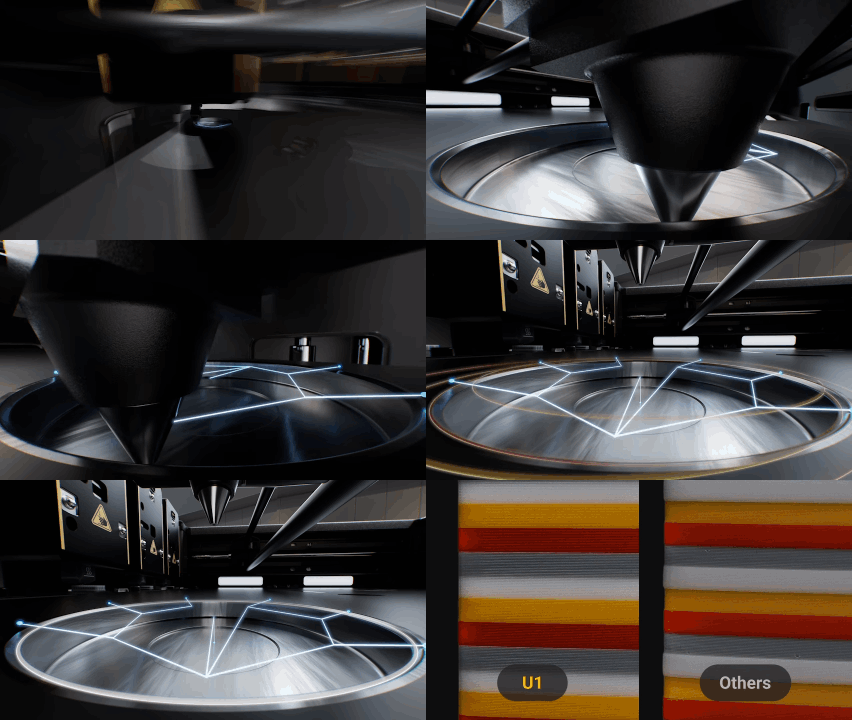
Manufacturer animation: calibrating the offsets between toolheads

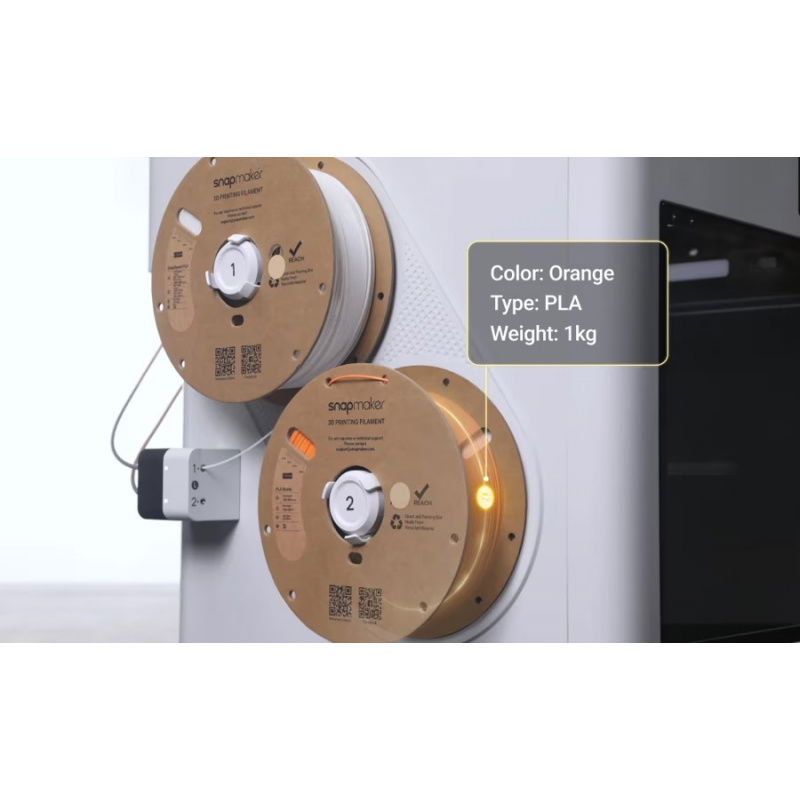
RFID reading: color, type and weight of the Snapmaker spool on screen
Filament loads itself, and RFID recognizes the spool
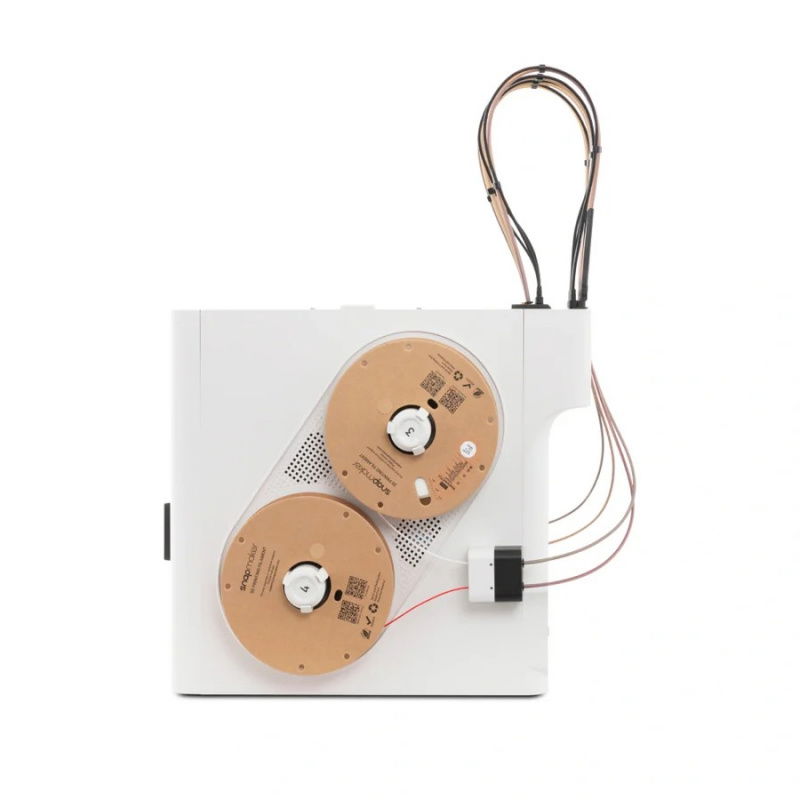
The printer holds up to four spools at once. Filament loads automatically, and Backup Mode switches the print to a spool with the same material when the previous one runs out. Snapmaker spools carry an RFID tag from which the U1 reads the color, type and other filament parameters. Purge waste goes into a waste collector that is easy to empty.
AI camera and over a dozen sensors
The built-in 2 MP camera lets you watch the print remotely and record time-lapses. AI-assisted monitoring automatically detects “spaghetti” and obstructions on the bed. Sensors also watch for filament run-out, air printing, toolhead parking errors, a missing build plate and power loss. When something goes wrong, the printer sends an alert or guides you through resuming the print.
- AI: “spaghetti” and obstructions on the bed
- Filament: spool run-out and air printing
- Mechanics: toolhead parking error and missing plate
- Power: resume after power loss

Obstacle detection on the build plate

Manufacturer animation: locking the toolhead in the ball coupling
Ball couplings, metal frame and carbon-fiber X axis
Each toolhead is guided into place by steel kinematic couplings and locked mechanically, without extra motors. The manufacturer tested this mechanism for over 1,000,000 swaps without a mechanical failure. A welded metal frame provides a stable base, and the lightweight carbon-fiber X axis reduces the moving mass, so the printer responds faster at high speeds.
270 x 270 x 270 mm build volume
A build volume of 270 x 270 x 270 mm fits large models, several parts at once or a whole batch of smaller items. The plate is a flexible steel sheet with a PEI surface, and the bed heats up to 100 °C. The stainless steel nozzles work at temperatures up to 300 °C. The maximum flow is 32 mm³/s (manufacturer's measurement with ABS filament at 280 °C).

270 x 270 x 270 mm build volume
Snapmaker U1 in the manufacturer's video
Official manufacturer video about the Snapmaker U1 printer.
Video: the manufacturer's official YouTube channel.
Snapmaker U1 reviewed by Forbot Creator
Polish review of the Snapmaker U1 on the Forbot Creator channel (Botland).
Video: Forbot Creator channel (Botland) on YouTube.

Botland is the only official distributor of Snapmaker 3D printers and accessories in Poland. Buying from us guarantees original equipment and fast technical support. We also run a professional service for these devices and offer original spare parts.

Snapmaker U1 from the front: 3.5-inch touchscreen
Snapmaker Orca, app and touchscreen
You prepare models in Snapmaker Orca, based on the open-source OrcaSlicer. It has ready-made filament profiles for the U1 and the Full Spectrum feature (beta), which mixes four filament colors into a wider range of shades. Everyday tasks are handled on the 3.5-inch touchscreen, and you can check and control the printer remotely in the Snapmaker App for Android and iOS. The U1 firmware is based on Klipper.
Is it the right choice for you?
A good choice if:
- You print models in several colors and want less waste
- You combine rigid and flexible materials in one print
- You need a large 270 mm build volume and fast CoreXY
Consider another option if:
- You mainly print ABS and ASA and don't want to buy a cover: U1 top cover
- You want to print fiber composites right away: hardened steel hotends
Frequently asked questions
What are the dimensions and weight of the Snapmaker U1?
The printer measures 584 x 499 x 730 mm and weighs 18.2 kg. The package measures 580 x 540 x 500 mm and weighs 26 kg including four 500 g spools of filament.
Which filaments come with the U1 printer?
The box contains 4 spools of SnapSpeed PLA, 500 g each. The manufacturer does not let you choose their colors.
Do I need the top cover for the U1?
Not for PLA, PETG, TPU, PVA and PCTG. The top cover, sold separately, creates an enclosed chamber for ABS, ASA, PA and PC and filters the air in three stages.
Does the Snapmaker U1 print with third-party filaments?
Yes, if they have a 1.75 mm diameter and good quality. RFID recognition only works with Snapmaker spools.
How long does it take to get the U1 ready for the first print?
About 2 hours: 15 minutes of unboxing, 40 minutes of assembly and 65 minutes of setup with calibration. Calibration is mostly automatic.
How loud is the Snapmaker U1?
At normal printing speed, the noise level at a distance of 1 m is 55 dB.
Package contents
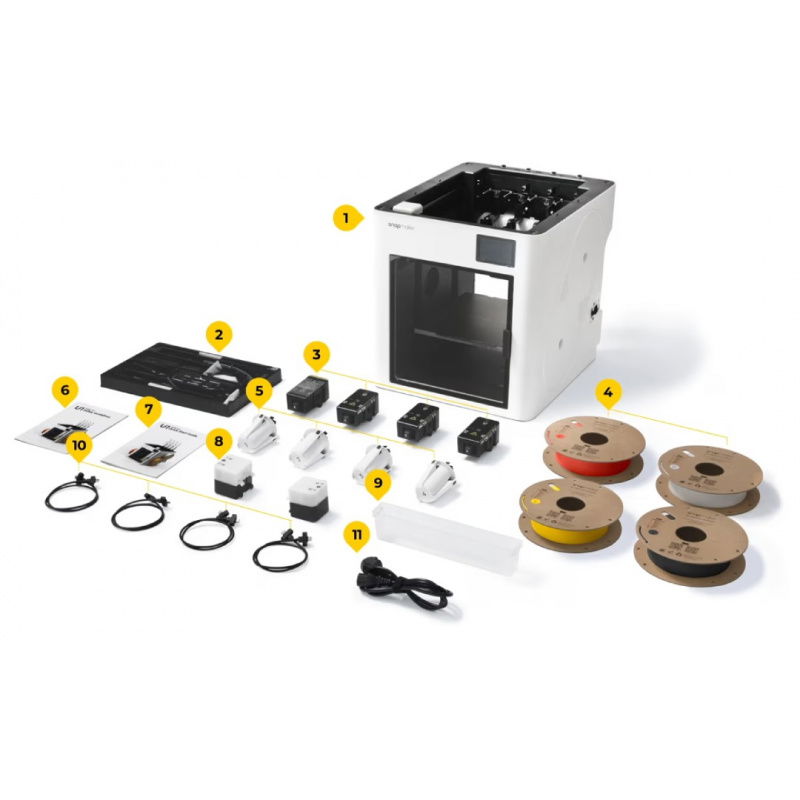
- 1 x Snapmaker U1 3D printer with textured PEI plate (1)
- 1 x Tool and accessory box (2)
- 4 x Toolhead with hotend (3)
- 4 x SnapSpeed PLA filament 500 g (4)
- 4 x Spool holder (5)
- 1 x Safety guidelines (6)
- 1 x Quick start guide (7)
- 2 x Filament feeder (8)
- 1 x Waste collector (9)
- 4 x Toolhead cable (10)
- 1 x AC power cable (11)
The numbers in brackets match the labels in the photo.

Contents of the Snapmaker U1 box with numbered items
Technical specification
| Parameter | Value |
|---|---|
| Manufacturer | Snapmaker |
| Printing technology | FDM |
| Build volume | 270 x 270 x 270 mm |
| Number of toolheads | 4 |
| Motion system | CoreXY, carbon-fiber X axis |
| Maximum toolhead speed | 500 mm/s |
| Maximum acceleration | 20,000 mm/s² |
| Extruder | Direct Drive |
| Nozzle | stainless steel, 0.4 mm |
| Maximum nozzle temperature | 300 °C |
| Maximum flow | 32 mm³/s (ABS, 280 °C) |
| Filament diameter | 1.75 mm |
| Part cooling | main and auxiliary fan |
| Build plate | flexible steel sheet with PEI surface |
| Maximum bed temperature | 100 °C |
| Filaments (without cover) | PLA, PETG, TPU, PVA, PCTG |
| Filaments (with top cover) | PLA, PETG, TPU, PVA, PET, ABS, ASA, PA, PC |
| Filaments (with cover and hardened nozzle) | also carbon-fiber and glass-fiber composites |
| Calibration | mesh leveling, Input Shaping with accelerometer, Pressure Advance, toolhead offsets |
| Filament system | auto-loading, Backup Mode, RFID |
| Fault detection | air printing, filament run-out, power loss, toolhead swap error, missing plate, bed obstruction |
| Display | 3.5" touchscreen, 320 x 480 px |
| Camera | 2 MP, in the chamber |
| Storage | 26 GB eMMC |
| Connectivity | WiFi 2.4 GHz (802.11b/g/n), USB flash drive |
| Software | Snapmaker Orca, OrcaSlicer (Windows, macOS, Linux) |
| App | Snapmaker App (Android, iOS) |
| Firmware | Klipper |
| Max. input power | 1150 W (220-240 V) |
| Max. input current | 6 A (220-240 V) |
| Noise level | 55 dB at 1 m at normal speed |
| Ambient temperature | 15 °C to 30 °C |
| Dimensions | 584 x 499 x 730 mm |
| Weight | 18.2 kg |
| Package | 580 x 540 x 500 mm, 26 kg |
Useful links
| Name | Value |
|---|---|
| 3D - print surface | 270x270x270 mm |
| 3D - type of printout | FFF/FDM |
| 3D - hotend amount | 4 |
| 3D - filament diameter | 1.75 mm |
| 3D - printing speed | 500 mm/s |
| 3D - nozzle temp | 300 °C |
| 3D - table temp. | 100 °C |
| Pole robocze | Medium |
| Wymiary pola roboczego - oś X | 270 mm |
| Wymiary pola roboczego - oś Y | 270 mm |
| Wymiary pola roboczego - oś Z | 270 mm |
| Plug&Play | Yes |
| 3D - Heated chamber | NO |
| 3D - Camera | Yes |
| 3D - Multi-material support | Yes |
| 3D - Supported Materials | Basic |
| 3D - Communication |
|
| Width | 58 cm |
| Height | 54 cm |
| Depth | 50 cm |
| Weight | 26 kg |
 GLS
Shipping in 24 hours
from €18.51
The full delivery terms are on the page Delivery and payment.
30 days to return, without giving a reason
If the product does not meet your expectations, you have 30 days from receiving the parcel to withdraw from the contract. The product only has to be complete. The right of return belongs to consumers (a purchase unrelated to business activity).
Complaints
If the product turns out to be faulty, you can make a claim under the guarantee or the statutory warranty. We handle claims without delay, at the latest within 14 working days of receiving the report together with the goods.
Question: Hello :) H2C Combo or SnapMaker U1 ? when it comes to failure rate, durability of components and printing accuracy? Because tests of speed and amount of waste Ive already seen a ton - and all in favor of SnapMaker .... Is it too early yet ? Because I hesitate :) And I have an X1C Combo and it is phenomenal
Instructions and documents
GPSR data
Products from the same category
See all

